Strength
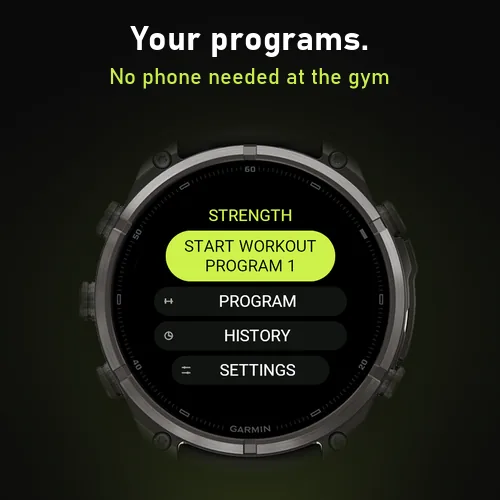
A gym set logger for Garmin watches. Pick a program, lift, press OK: the set is logged and the rest timer starts. Works offline, with no account and no companion app.
Get it in the Connect IQ Store Read the user guide
Features
- One press per set: OK logs the weight and reps and starts the rest
- Rest countdown on the bezel, with vibration, sound and a heads-up before it ends
- Four ready-made programs plus four of your own, edited on the watch or the phone
- 121 exercises by muscle group, plus 12 custom exercises
- Weight suggestions from your last session, one step heavier when you hit every rep
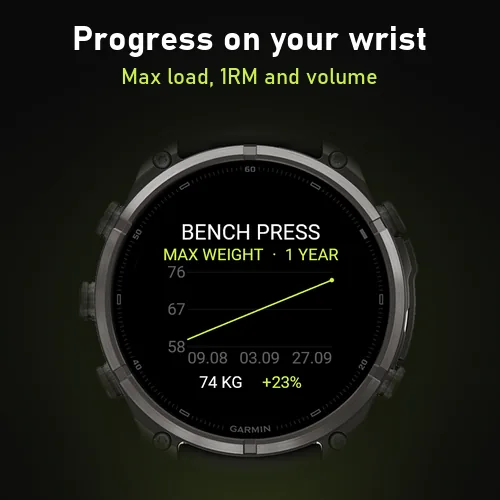
- Personal records, workout history and progress charts on the watch
- You choose what syncs to Garmin Connect
- Eight accent colours, 34 languages, round, square and two-colour displays
Requirements
Garmin watches with Connect IQ 3.2 or newer: Forerunner, fēnix, epix, Enduro, Instinct, Venu, vívoactive, MARQ, Descent, D2 and Approach models. Settings on the phone need Garmin Connect or the Connect IQ app.
User guide
Getting started
- Install Strength from the Connect IQ Store, in the Connect IQ app or Garmin Connect on your phone, and sync your watch.
- On the watch, open your apps (or activities) list and choose Strength.
- The home screen has Start workout, Program, History and Settings.
| Button | What it does |
|---|---|
| START/OK | Choose, and log a set during a workout |
| UP/DOWN | Move in lists, and change the highlighted weight or reps |
| BACK/LAP | Go back. In a workout it switches between KG and REPS |
| MENU (hold UP) | The workout menu, and edit or delete in lists |
On touchscreen watches you can tap rows and swipe up and down. Swipe right to go back, except during a workout, where swiping left or right switches between KG and REPS.
Leaving the app: press BACK (or swipe right) until you are on the home screen, then once more. During a workout, finish it first with MENU › Finish workout.
A workout at the gym
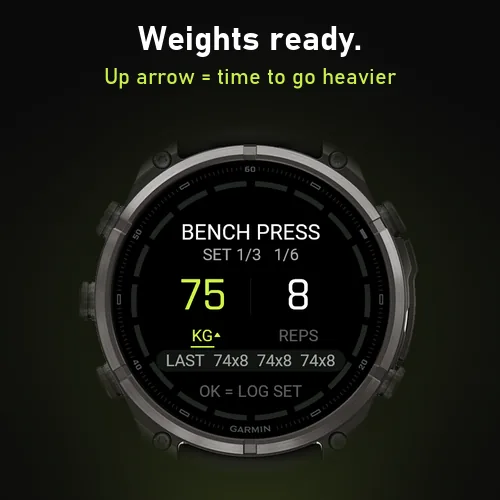
- Choose Start workout. The first exercise shows last time's heaviest weight and the program's target reps. The line at the bottom shows every set from last time, for example
LAST 60x8 60x8 60x7. - ↑ next to KG means you reached the target reps in every set last time, so the weight has gone up one step. Press DOWN to keep the old weight.
- UP/DOWN change the highlighted value and BACK/LAP switches between KG and REPS. Press quickly several times in a row and the weight changes faster.
- Lift, then press START/OK once. The set is logged and the rest starts.
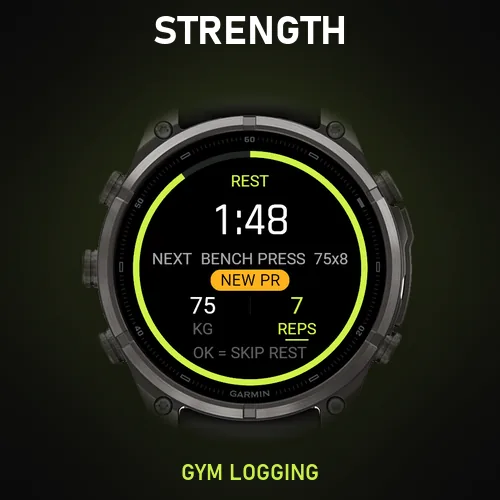
- During the rest, reps are highlighted: use UP/DOWN if you did more or fewer reps than planned. LAP switches to the weight. A new personal record vibrates and shows NEW PR.
- The watch gives a short alert 10 seconds before the rest ends, and a longer one (with sound if tones are on) when it is over. The screen lights up and shows the next set. An extra press right after logging never skips the rest.
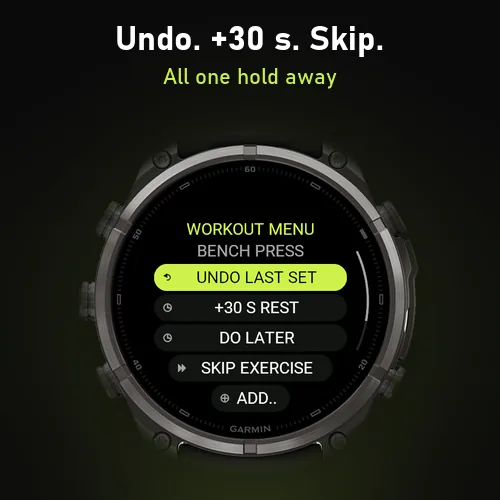
- Hold MENU for the workout menu: Undo last set, +30 s rest, Do later, Skip exercise, Add/remove set and Finish workout.
- After the last set you can check and correct it before you press START/OK = Save.
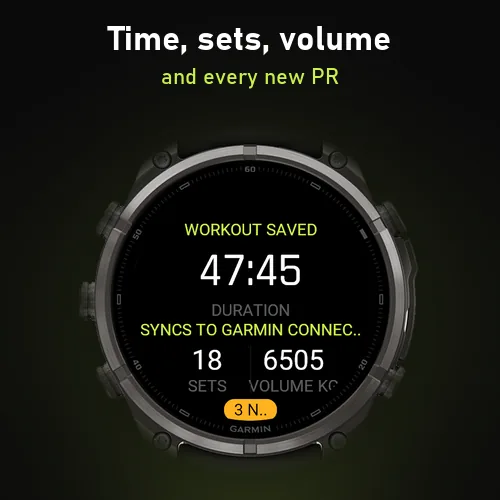
- Choose Save + sync (the workout becomes an activity in Garmin Connect) or Watch only (nothing is sent to your phone). The summary shows time, sets, volume and new records.
Exercises without weight are logged at 0 kg and get their own charts for max reps and total reps.
Programs
Strength has four ready-made programs (Full body, Strength, Muscle gain and At home) and four slots for your own.
Create a program on the watch
- Open Program and choose + New program at the bottom of the list.
- Type a name with the watch's text picker, or skip it to keep "Program 1–4".
- Choose + Add exercise, then a muscle group and an exercise, and set sets, reps, rest and start weight. Repeat for each exercise.
Change a program on the watch: highlight it in the Program list and hold MENU. You get Exercises (add, change, or hold MENU on an exercise to remove it), Rename and Delete program (press twice).
On your phone: open Garmin Connect or the Connect IQ app, find Strength among your watch's apps and open Settings. Each program has a Program name field and a list of exercises with sets, reps, rest (seconds) and start weight (decimals such as 22.5 kg are allowed).
- Each row has an Exercise name, such as "1. BENCH PRESS", filled in and overwritten by the watch: you can leave it alone. A row you have just added gets its name once the watch has received the settings: close and reopen the settings to see it.
- Change the order: open an exercise, set Order to the position you want (1 for the top, 0 to leave it) and save. The watch moves it there and renumbers the rest. Garmin's settings list has no drag and drop.
Phone settings are only available when Strength is installed from the Connect IQ Store.
Your own exercises
There are 12 slots for exercises of your own, and each can be used in several programs.
On the watch
- Open the program: Program › highlight it › hold MENU › Exercises.
- Choose + Add exercise › My exercises › + New exercise.
- Type the name, choose a muscle group, then set sets, reps, rest and start weight, and choose Save.
On the phone
- In Strength's settings, open My exercises, add a row, choose a free Custom 1–12 slot, type the name and choose a muscle group.
- Open Program 1–4, add a row and choose the same Custom slot as the exercise.
- Save, and sync your watch.
The exercise picker on the phone shows "Custom 1–12" because Garmin's settings lists cannot show names you have typed. The watch, and the exercise name on each program row, show the real name.
Settings
All settings are on the watch under Settings, and in the phone settings.
- Weight step: 0.5, 1, 1.25, 2, 2.5 (default), 5 or 10 kg.
- Rest alert: vibration + sound (default), vibration, sound or off. Your watch's own vibration and tone settings still apply.
- Pre-alert: a short alert 10 s (default) or 5 s before the rest ends, or none. Used for rests of 30 seconds or more. The rest length itself is set per exercise in the program.
- Garmin Connect: Ask (default: choose Save + sync or Watch only after each workout), Always or Never.
- Colour: lime, cyan, orange, red, blue, purple, pink or white. Two-colour Instinct watches are always black and white.
History and progress
Past workouts: open History › Workout history, choose a workout and scroll through every exercise and set with weight and reps.
Progress charts: open History › Progress and choose an exercise.
- START/OK switches between max weight, estimated 1RM and volume.
- Hold MENU to switch between 4 weeks, 3 months, 1 year and all time. On touchscreens, tap the left or right side of the chart to change the period, and the middle to change what is measured.
- UP/DOWN jump to the next exercise.
The space between points matches the real time between workouts. Estimated 1RM uses the Epley formula, up to 12 reps.
Most watches keep the last 220 workouts, more than a year at four workouts a week. Watches with little app memory (Forerunner 55, Venu Sq and the Instinct family) keep 60. When the limit is reached, the oldest workout is removed from the watch.
The watch and Garmin Connect
| On the watch (History) | In Garmin Connect | |
|---|---|---|
| Which workouts | The last 220 (60 on small watches), whatever you chose to sync | Every workout saved with sync |
| Each set (exercise, kg, reps) | Yes | Yes, as one lap per set* |
| Time, heart rate, calories | No | Yes |
| Progress charts and weight suggestions | Yes | No |
| Without phone or internet | Yes | No |
* The exercise, weight and reps fields need Strength installed from the Connect IQ Store, and are not recorded on the Forerunner 55, Venu Sq and Instinct family. Find them under laps or Connect IQ data on the activity in Garmin Connect.
- A workout saved as Watch only is gone for good once the watch removes it to make room.
- Deleting an activity in Garmin Connect does not change the history on the watch, and the other way round.
Glance
Add Strength to your watch's glances (usually: hold MENU, open Glances and choose Add). It shows the program for your next workout and how long ago you trained, with sets and volume. If a workout was interrupted, it shows Resume workout. Press START/OK or tap it to open Strength.
Interrupted workout
If the app closes in the middle of a workout, you are offered Resume workout, Save workout or Discard workout the next time you open it. Resume and Save always give one single activity in Garmin Connect (or none, if you chose Watch only).
Troubleshooting
- No settings on the phone: they appear only when Strength is installed from the Connect IQ Store, and your watch is connected to the phone.
- A phone change does not show on the watch: sync the watch in Garmin Connect, then reopen Strength. A running workout is never changed: new settings apply from the next one.
- No exercise names in the phone list: the watch fills them in after it has received the settings. Open Strength on the watch once, then reopen the settings on the phone.
- Can't leave the app: press BACK (or swipe right) until you reach the home screen, then once more. During a workout, finish it from MENU first.
Support
Email primowatch3s@gmail.com with your watch model. Strength sends no data to us: see the privacy policy.